
Guide Guía
Odontogram
Odontograma
Pick and paint: record diagnoses and procedures by surface, tooth, arch or whole mouth, follow the treatment plan and turn it into a budget.
Elegir y pintar: registra diagnósticos y procedimientos por superficie, pieza, arcada o boca completa, sigue el plan de tratamiento y conviértelo en presupuesto.
Open this screen → Abrir esta pantalla →Several odontograms per patient Varios odontogramas por paciente
The Odontogram block of a visit first lists every odontogram of the patient, newest first. Each card shows the visit and professional it was charted in, how many diagnoses and procedures it holds, its progress and the budgets generated from it.
El bloque Odontograma de una visita lista primero todos los odontogramas del paciente, del más reciente al más antiguo. Cada tarjeta muestra la consulta y el profesional con que se pintó, cuántos diagnósticos y procedimientos tiene, su avance y los presupuestos generados desde él.
A new treatment plan is a new odontogram: the New odontogram button creates an empty one on the current visit and opens it in a full-screen window. The previous ones are never overwritten.
Un nuevo plan de tratamiento es un nuevo odontograma: el botón Nuevo odontograma crea uno vacío en la consulta actual y lo abre en una ventana a pantalla completa. Los anteriores nunca se sobrescriben.
- Open edits a chart; View shows it read-only when the visit is finished or you lack permission.
- Abrir edita un odontograma; Ver lo muestra de solo lectura cuando la visita está finalizada o no tienes permiso.
- Delete is only offered while the odontogram has no budgets. With a budget it stays in the record.
- Eliminar solo se ofrece mientras el odontograma no tiene presupuestos. Con un presupuesto se conserva en el registro.
- The list is paginated when the patient has many odontograms.
- La lista se pagina cuando el paciente tiene muchos odontogramas.
- New odontogram Nuevo odontograma
- Starts another treatment plan on the current visit and opens it full screen. Older odontograms are never overwritten. Inicia otro plan de tratamiento en la consulta actual y lo abre a pantalla completa. Los odontogramas anteriores nunca se sobrescriben.
- Card Tarjeta
- Date, visit and professional it was charted in, how many diagnoses and procedures it holds, the progress bar and the budgets generated from it. Fecha, consulta y profesional con que se pintó, cuántos diagnósticos y procedimientos tiene, la barra de avance y los presupuestos generados desde él.
- Open · View Abrir · Ver
- Open edits the chart; View appears when it is read-only (finished visit or no permission). Abrir lo edita; Ver aparece cuando es de solo lectura (visita finalizada o sin permiso).
- Delete Eliminar
- Only while the odontogram has no budgets. Once it has one, it stays in the record. Solo mientras el odontograma no tiene presupuestos. Con uno generado, se conserva en el registro.
One idea: pick and paint Una sola idea: elegir y pintar
Choose a diagnosis or a procedure from the palette. It becomes your brush, and every click applies it. Clicking the same place again removes it. There is no dialog per tooth and no “add” button: what is on the chart is exactly what you clicked.
Elige un diagnóstico o un procedimiento de la paleta. Se convierte en tu pincel, y cada clic lo aplica. Volver a hacer clic en el mismo lugar lo quita. No hay un diálogo por pieza ni un botón «agregar»: lo que está en el odontograma es exactamente lo que pulsaste.
- In the palette, choose Diagnoses or Procedures and search by name or code.
- En la paleta, elige Diagnósticos o Procedimientos y busca por nombre o código.
- Click an item: it turns into the brush at the top, in its colour.
- Haz clic en un ítem: se convierte en el pincel de arriba, con su color.
- Pick the mode — Surface, Tooth, Arch or Mouth.
- Elige el modo: Superficie, Pieza, Arcada o Boca.
- Click on the chart. Repeat with the next finding; the ✕ on the brush puts it down.
- Haz clic en el odontograma. Repite con el siguiente hallazgo; la ✕ del pincel lo suelta.
- Brush Pincel
- The diagnosis or procedure you picked, in its catalogue colour. The ✕ puts it down. El diagnóstico o procedimiento elegido, con el color de su catálogo. La ✕ lo suelta.
- Surface · Tooth · Arch · Mouth Superficie · Pieza · Arcada · Boca
- What one click paints: one face, the whole tooth, a whole arch, or the whole mouth (with “Apply to the whole mouth”). Qué pinta un clic: una cara, la pieza entera, una arcada completa o toda la boca (con «Aplicar a toda la boca»).
- Show primary teeth Mostrar dientes temporales
- Adds the primary dentition (51–85) for children. Agrega la dentición temporal (51–85) para niños.
- Undo · Save Deshacer · Guardar
- Undo (or Ctrl+Z) reverts the last click. It saves by itself 1.5 s after you stop; the button saves right away. Deshacer (o Ctrl+Z) revierte el último clic. Se guarda solo 1,5 s después de que dejas de pintar; el botón guarda al instante.
The palette and the chart La paleta y el odontograma
Diagnoses show your clinic’s catalogue first and then the general ICD-10 catalogue. Procedures come only from the clinic catalogue, with their price — that price is what the budget will use. If there are no procedures yet, an administrator adds them in Settings → Procedures.
Diagnósticos muestra primero el catálogo de tu clínica y después el catálogo general CIE-10. Procedimientos sale solo del catálogo de la clínica, con su precio: ese precio es el que usará el presupuesto. Si aún no hay procedimientos, un administrador los agrega en Configuración → Procedimientos.
- The upper arch goes on top and the lower arch below, from the patient’s right (18 → 28, 48 → 38).
- La arcada superior va arriba y la inferior abajo, desde la derecha del paciente (18 → 28, 48 → 38).
- Tick Show primary teeth to add the primary dentition (51–85).
- Marca Mostrar dientes temporales para agregar la dentición temporal (51–85).
- Colour, name, code and price are copied into the chart: recolouring or repricing the catalogue later does not change a chart already recorded.
- Color, nombre, código y precio se copian al odontograma: recolorear o cambiar el precio del catálogo después no altera un odontograma ya registrado.
The four modes Los cuatro modos
The mode decides what one click covers.
El modo decide qué cubre un clic.
- Surface: one face of the tooth — caries on the occlusal of 16, a resin on the mesial of 26.
- Superficie: una cara de la pieza — caries en la oclusal de 16, una resina en la mesial de 26.
- Tooth: the whole tooth — an extraction, a crown, a root canal.
- Pieza: la pieza entera — una extracción, una corona, una endodoncia.
- Arch: a whole arch, permanent or primary — a splint or an upper prosthesis. It is quoted once, not once per tooth.
- Arcada: una arcada completa, permanente o temporal — una férula o una prótesis superior. Se cotiza una vez, no una por pieza.
- Mouth: the whole mouth with “Apply to the whole mouth” — orthodontics, a full cleaning. Also quoted once.
- Boca: toda la boca con «Aplicar a toda la boca» — ortodoncia, una profilaxis completa. También se cotiza una vez.
Reading the surfaces Cómo leer las caras
Each tooth is drawn as five faces. Two rules keep the record right:
Cada pieza se dibuja con cinco caras. Dos reglas mantienen el registro correcto:
- Mesial always faces the midline. It is drawn on the right in quadrants 1, 4, 5 and 8, and on the left in the others. Look at 16 and 26 below: the same mesial face sits on opposite sides.
- Mesial siempre mira a la línea media. Se dibuja a la derecha en los cuadrantes 1, 4, 5 y 8, y a la izquierda en los demás. Mira 16 y 26 abajo: la misma cara mesial queda en lados opuestos.
- The inner face is palatal on top and lingual below; the centre is occlusal on teeth that chew and incisal on teeth that cut.
- La cara interna es palatino arriba y lingual abajo; el centro es oclusal en las piezas que mastican e incisal en las que cortan.
The lists under the chart Las listas debajo del odontograma
Everything painted also appears as two lists — Diagnoses and Procedures — with tooth, face and name. Write observations on any row, remove a row with ✕, and set each procedure’s status: Pending, In progress (in observation) or Done.
Todo lo pintado aparece también en dos listas —Diagnósticos y Procedimientos— con pieza, cara y nombre. Escribe observaciones en cualquier fila, quita una fila con la ✕ y marca el estado de cada procedimiento: Pendiente, En proceso (en observación) o Realizado.
It saves by itself 1.5 seconds after your last click, and the status next to the Save button tells you whether everything is saved. Ctrl+Z undoes the last click.
Se guarda solo 1,5 segundos después de tu último clic, y el estado junto al botón Guardar te dice si todo está guardado. Ctrl+Z deshace el último clic.
From the chart to the budget Del odontograma al presupuesto
The budget panel quotes, as you paint, every procedure with a price that is not done yet. Diagnoses are findings, so nobody pays for them. The quantity is the number of teeth for a per-tooth procedure, and one for an arch or the whole mouth.
El panel de presupuesto cotiza, mientras pintas, cada procedimiento con precio que aún no está realizado. Los diagnósticos son hallazgos, así que no se cobran. La cantidad es el número de piezas para un procedimiento por pieza, y uno para una arcada o toda la boca.
- Generating again updates the current budget. Once it has payments it can no longer change: the button becomes Generate new budget, a new one is created and the paid one is kept. Both stay listed on the odontogram.
- Generar de nuevo actualiza el presupuesto vigente. Cuando ya tiene pagos no puede cambiar: el botón pasa a Generar nuevo presupuesto, se crea uno nuevo y el pagado se conserva. Ambos quedan listados en el odontograma.
- Each budget card shows its status and opens its payments and PDF; with several budgets the card also shows the total quoted.
- Cada presupuesto muestra su estado y abre sus pagos y su PDF; con varios presupuestos aparece también el total cotizado.
- Discounts can be set per line, as an amount or a percentage.
- Se pueden poner descuentos por línea, en valor o en porcentaje.
- The generated budget appears in Budgets like any other, ready to register payments.
- El presupuesto generado aparece en Presupuestos como cualquier otro, listo para registrar pagos.
- Apply the patient’s agreement Aplicar el convenio del paciente
- Applies the insurance discount the patient has. It is never applied on its own. Aplica el descuento del seguro que tiene el paciente. Nunca se aplica solo.
- Generate / Update budget Generar / Actualizar presupuesto
- Turns the priced procedures not yet done into a budget in Budgets. Generating again updates the same one while it has no payments; after the first payment it becomes Generate new budget and the paid one is kept. Convierte los procedimientos con precio aún no realizados en un presupuesto en Presupuestos. Generarlo de nuevo actualiza el mismo mientras no tenga pagos; tras el primer pago pasa a Generar nuevo presupuesto y el pagado se conserva.
- Budgets of this odontogram Presupuestos de este odontograma
- Every budget generated from this odontogram, with its payments and its PDF. The current one is the one that generating again updates. Todos los presupuestos generados desde este odontograma, con sus pagos y su PDF. El vigente es el que se actualiza al generarlo de nuevo.
- New odontogram Nuevo odontograma
- Another treatment plan is another odontogram: the button above the list starts an empty one on this visit, with its own budgets. The previous ones stay listed. Otro plan de tratamiento es otro odontograma: el botón sobre la lista crea uno vacío en esta consulta, con sus propios presupuestos. Los anteriores siguen en la lista.
The treatment plan across visits El plan de tratamiento entre visitas
The green history button on the Odontogram block lists every chart of the patient with its progress — pending, in observation and done. A treatment plan lives across visits: you can mark last month’s root canal as done from today’s visit.
El botón verde de historial del bloque Odontograma lista cada odontograma del paciente con su avance: pendiente, en observación y realizado. El plan de tratamiento vive entre visitas: puedes marcar como realizada la endodoncia del mes pasado desde la visita de hoy.
- At a follow-up, open the Odontogram history.
- En el control, abre el Historial del odontograma.
- Copy or Copy pending brings the chart, or only what is still to be done, into a new odontogram on today’s visit — it is never mixed into an existing one.
- Copiar o Copiar pendientes trae el odontograma, o solo lo que falta por hacer, a un odontograma nuevo de la visita de hoy: nunca se mezcla con uno existente.
- As you complete each procedure, set it to Done — the progress bar and the budget follow.
- A medida que completes cada procedimiento, márcalo como Realizado: la barra de avance y el presupuesto lo siguen.
- Progress Avance
- Share of procedures pending, in observation and done in each chart. Porcentaje de procedimientos pendientes, en observación y realizados de cada odontograma.
- Status Estado
- Change a procedure to in observation or done even on an older chart: the treatment plan lives across visits. Cambia un procedimiento a en observación o realizado aunque el odontograma sea de otra visita: el plan de tratamiento vive entre consultas.
- Copy · Copy pending Copiar · Copiar pendientes
- The whole chart, or only what is still to be done, into a new odontogram on today’s visit. Todo el odontograma, o solo lo que falta por hacer, en un odontograma nuevo de la visita de hoy.
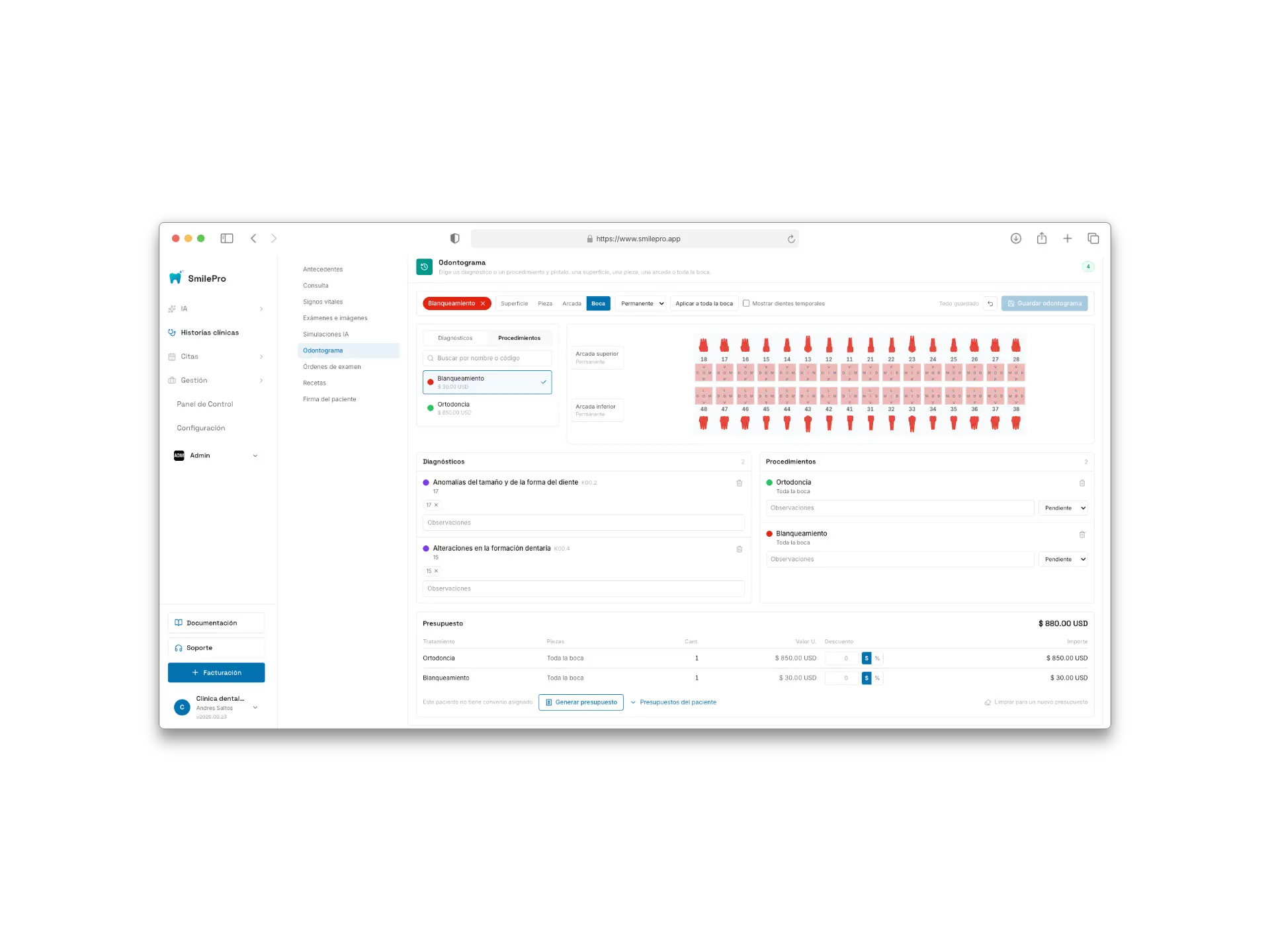
The odontogram with brush bar, palette, chart, lists and budget.
El odontograma con la barra de pincel, la paleta, las arcadas, las listas y el presupuesto.
https://cdn.smilepro.app/docs/odontogram-full.webp Once the visit is finalized the chart is read-only, but procedure statuses can still move from the history — the plan keeps going at the next visit.
Con la visita finalizada el odontograma es de solo lectura, pero los estados de los procedimientos se siguen moviendo desde el historial: el plan continúa en la siguiente visita.