
Guide Guía
Clinical history
Historia clínica
The whole visit on one page, block by block: antecedents, consultation, vital signs, studies, simulations, odontogram, orders, prescriptions and signature.
Toda la visita en una sola página, bloque a bloque: antecedentes, consulta, signos vitales, estudios, simulaciones, odontograma, órdenes, recetas y firma.
Open this screen → Abrir esta pantalla →Where to find it Dónde encontrarla
Clinical histories has its own entry in the sidebar, right below AI — it is not inside Appointments. It is its own permission too: doctors, owners and administrators can have it; assistants never do.
Historias clínicas tiene su propia entrada en el menú lateral, justo debajo de IA: no está dentro de Citas. También es un permiso propio: doctores, propietarios y administradores pueden tenerlo; los asistentes nunca.
There are three doors, and all of them lead to the same page:
Hay tres puertas, y todas llevan a la misma página:
- From the calendar: open the appointment and choose the clinical history. Date, professional and patient come filled in. Only appointments booked as Clinical history appear here — those booked as Facial aesthetics belong to that module and are not listed among the histories.
- Desde el calendario: abre la cita y elige la historia clínica. Solo aparecen las citas agendadas como Historia clínica; las agendadas como Estética facial pertenecen a ese módulo y no se listan entre las historias. Fecha, profesional y paciente vienen llenos.
- From the list: search by patient, ID or record number and open their folder — antecedents, every visit and the button for a new one.
- Desde el listado: busca por paciente, documento o número de historia y abre su carpeta: antecedentes, todas sus visitas y el botón para una nueva.
- Immediate care: a patient who walked in without an appointment. It opens today’s visit; if one is already open today, it returns that one instead of creating a second.
- Atención inmediata: un paciente que llegó sin cita. Abre la visita de hoy; si ya hay una abierta hoy, devuelve esa en lugar de crear otra.
- The free plan includes 50 clinical histories; a paid doctor user makes them unlimited.
- El plan gratuito incluye 50 historias clínicas; un usuario doctor de pago las vuelve ilimitadas.
- Immediate care Atención inmediata
- Opens today’s visit for a patient who arrived without an appointment. Pick the patient and, if your user is not tied to one, the professional. Abre la visita de hoy para un paciente que llegó sin cita. Elige al paciente y, si tu usuario no está atado a uno, el profesional.
- Open folder Abrir carpeta
- The patient’s folder: antecedents, every visit and the button to start a new one. La carpeta del paciente: antecedentes, todas sus visitas y el botón para empezar una nueva.
An appointment needs a patient file before its history can open. If the calendar only has a typed name, SmilePro asks you to find or create the patient first.
Una cita necesita la ficha del paciente para abrir su historia. Si en el calendario solo hay un nombre escrito, SmilePro te pide buscar o crear al paciente primero.
The visit header and its buttons El encabezado de la visita y sus botones
The header always shows who you are treating: name, ID, age, visit date, record number and visit number. Allergies appear as a red pill and relevant conditions (hypertension, anticoagulants…) as amber pills, so they are seen before anything is prescribed.
El encabezado muestra siempre a quién atiendes: nombre, documento, edad, fecha de la visita, número de historia y número de consulta. Las alergias salen como etiqueta roja y las condiciones relevantes (hipertensión, anticoagulantes…) como etiquetas ámbar, para verlas antes de recetar nada.
- Finalize clinical history Finalizar historia clínica
- Locks the visit as a record. Asks for confirmation and tells you how many days you have to reopen it. If the visit came from an appointment, it becomes attended. Cierra la visita como registro. Pide confirmación y te dice cuántos días tienes para reabrirla. Si la visita salió de una cita, la cita pasa a atendida.
- Reopen consultation Reabrir consulta
- Appears once the visit is closed, while the clinic’s edit window allows it. Reopening is deliberate and recorded. Aparece con la visita cerrada, mientras el plazo de edición de la clínica lo permita. Reabrir es un acto deliberado y queda registrado.
- Certificates Certificados
- IESS rest certificate or a clinic template, filled with this patient and doctor. Only after the consultation is recorded. The counter shows how many were issued. Certificado de reposo IESS o una plantilla de la clínica, rellenados con este paciente y doctor. Solo con la consulta registrada. El contador muestra cuántos se emitieron.
- Download PDF Descargar PDF
- The whole visit as a document, odontogram drawn and patient signature at the end. Shown only if the clinic lets your role download. La visita completa como documento, con el odontograma dibujado y la firma del paciente al final. Solo aparece si la clínica permite descargar a tu rol.
- Options → Next appointment Opciones → Próxima cita
- Books the follow-up with the same professional without leaving the visit — even after it is closed. Agenda el control con el mismo profesional sin salir de la visita, incluso con la visita cerrada.
Moving through the page Moverse por la página
On a computer, the left rail lists every block in order and marks the one you are reading; one click jumps to it. Below it, Previous visits lists the patient’s other consultations so you can open one without leaving.
En computadora, el índice de la izquierda lista cada bloque en orden y marca el que estás leyendo; un clic salta a él. Debajo, Visitas anteriores lista las otras consultas del paciente para abrir una sin salir.
The order is the order of work. Antecedents come first: without them the consultation cannot be recorded, and without the consultation the blocks below stay locked.
El orden es el orden de trabajo. Los antecedentes van primero: sin ellos no se registra la consulta, y sin la consulta los bloques de abajo quedan bloqueados.
The history buttons Los botones de historial
From Consultation down, every block has a green button with a clock on the left of its title. It opens that section’s history for this patient — every past record, not only this visit — and lets you bring one into today with Copy.
De la Consulta hacia abajo, cada bloque tiene un botón verde con un reloj a la izquierda del título. Abre el historial de esa sección para este paciente —todos los registros anteriores, no solo de esta visita— y te deja traer uno a hoy con Copiar.
- Consultation: date, professional, type, attention, reason and current illness. Copy brings the notes; today’s date is not touched.
- Consulta: fecha, profesional, tipo, atención, motivo y enfermedad actual. Copiar trae las notas; la fecha de hoy no se toca.
- Vital signs: every take, numbered, with its comment and a date filter. Copy brings the numbers to review and save.
- Signos vitales: cada toma numerada, con su comentario y filtro por fechas. Copiar trae los números para revisarlos y guardar.
- Exams and images: studies of every visit. They are viewed and downloaded in their visit; they are not copied.
- Exámenes e imágenes: estudios de todas las visitas. Se ven y descargan en su visita; no se copian.
- Odontogram: each chart with its progress. Copy the whole chart or only what is pending, and change a procedure’s status. See the Odontogram guide.
- Odontograma: cada odontograma con su avance. Copia todo o solo lo pendiente, y cambia el estado de un procedimiento. Mira la guía de Odontograma.
- Prescriptions and exam orders: Copy opens the editor with those medicines or exams; download them with or without signature.
- Recetas y órdenes de examen: Copiar abre el editor con esos medicamentos o exámenes; se descargan con o sin firma.
- Signature: who signed and when. A signature belongs to its visit and is never copied.
- Firma: quién firmó y cuándo. Una firma es de su visita y nunca se copia.
- Green history button Botón verde de historial
- Opens every record of this patient in this section — not just this visit — with the option to copy it into today. Abre todos los registros de este paciente en esta sección —no solo de esta visita— con la opción de copiarlos a la de hoy.
- State pill Etiqueta de estado
- Pending, Recorded, Optional, Signed… Tells you what is left without scrolling. Pendiente, Registrado, Opcional, Firmada… Te dice qué falta sin desplazarte.
- Charts Gráficos
- Vital signs only: how pressure, weight or glycemia moved across visits. Solo en signos vitales: cómo cambiaron presión, peso o glucemia entre visitas.
- Copy Copiar
- Brings that record into today’s visit for you to review and save. Nothing is saved until you do. Trae ese registro a la visita de hoy para que lo revises y guardes. No se guarda nada hasta que lo hagas.
- Copy pending Copiar pendientes
- Odontogram only: copies just the procedures not done yet — the rest of the treatment plan. Solo en odontograma: copia únicamente los procedimientos aún no realizados, lo que queda del plan de tratamiento.
- This visit Esta visita
- The row you are already working on; there is nothing to copy. La fila en la que ya estás trabajando; no hay nada que copiar.
- Download Descargar
- Budget, prescription or exam order of that visit, with or without the professional’s signature. Presupuesto, receta u orden de examen de esa visita, con o sin la firma del profesional.
Copy never saves on its own. It fills today’s form; you review it and press Save.
Copiar nunca guarda solo. Llena el formulario de hoy; lo revisas y pulsas Guardar.
1. Antecedents 1. Antecedentes
Recorded once and read by every visit: personal, family and oral antecedents, toxic habits with frequency, and allergies in a field of their own. Tap the conditions that apply and add anything the lists do not cover in the notes.
Se registran una vez y los lee cada visita: antecedentes personales, familiares y bucales, hábitos tóxicos con su frecuencia, y las alergias en un campo propio. Toca las condiciones que aplican y agrega en las notas lo que las listas no cubren.
- Allergies are copied, read-only, onto every prescription issued afterwards.
- Las alergias se copian, de solo lectura, a cada receta que se emita después.
- A closed visit does not lock them: correcting an allergy corrects it everywhere.
- Una visita cerrada no los bloquea: corregir una alergia la corrige en todas.
- A patient with nothing to report still needs them saved once, to leave record that there are none.
- Un paciente sin nada que reportar igual necesita guardarlos una vez, para dejar constancia de que no hay.
2. Consultation 2. Consulta
Date, type (first time or follow-up), form (in person, virtual, home), attention type, reason in the patient’s words, current illness, clinical exam and treatment plan. The reason is required; everything below unlocks once the consultation is saved.
Fecha, tipo (primera vez o subsecuente), forma (presencial, virtual, domiciliaria), tipo de atención, motivo en palabras del paciente, enfermedad actual, examen clínico y plan de tratamiento. El motivo es obligatorio; todo lo de abajo se desbloquea al guardar la consulta.
- Add diagnoses from the clinic catalogue or from ICD-10.
- Agrega diagnósticos desde el catálogo de la clínica o desde CIE-10.
- Administrators can add custom attention types in Catalogs.
- Los administradores pueden agregar tipos de atención propios en Catálogos.
- Everything typed here is encrypted before it reaches the database.
- Todo lo que se escribe aquí se cifra antes de llegar a la base de datos.
3. Vital signs 3. Signos vitales
Optional. Pressure, temperature, heart and respiratory rate, oxygen saturation, perimeters, weight, height and glycemia. An empty field means not taken, never zero. Mean arterial pressure and BMI are calculated for you.
Opcional. Presión, temperatura, frecuencia cardiaca y respiratoria, saturación, perímetros, peso, talla y glucemia. Un campo vacío significa no tomado, nunca cero. La presión arterial media y el IMC se calculan solos.
- New take Nueva toma
- Empties the form and saves a second measurement for the same visit. Saving without it corrects the last take instead. Vacía el formulario y guarda una segunda medición en la misma visita. Guardar sin pulsarlo corrige la última toma.
- Charts Gráficos
- Evolution of each sign across the patient’s visits. La evolución de cada signo en las visitas del paciente.
4. Exams, images and AI simulations 4. Exámenes, imágenes y simulaciones IA
Attach panoramics, periapicals and lab results to this visit — up to 8 files per study (JPG, PNG, WEBP, PDF, Word or Excel). Right after, AI simulations lists the patient’s smile designs and lets you generate a new one with the patient already assigned; it uses 1 image credit and requires the AI permission.
Adjunta panorámicas, periapicales y resultados de laboratorio a esta visita, hasta 8 archivos por estudio (JPG, PNG, WEBP, PDF, Word o Excel). Justo después, Simulaciones IA lista los diseños de sonrisa del paciente y permite generar uno nuevo con el paciente ya asignado; usa 1 crédito de imagen y requiere el permiso de IA.
5. Odontogram 5. Odontograma
Pick a diagnosis or a procedure and paint it on a surface, a tooth, an arch or the whole mouth. The budget comes out of it. It has a guide of its own.
Elige un diagnóstico o un procedimiento y píntalo en una superficie, una pieza, una arcada o toda la boca. De ahí sale el presupuesto. Tiene su propia guía.
Read the Odontogram guide before the first chart: mesial always faces the midline, and that is what decides which face you record.
Lee la guía de Odontograma antes del primer registro: mesial siempre mira a la línea media, y eso decide qué cara registras.
6. Exam orders, prescriptions and certificates 6. Órdenes de examen, recetas y certificados
Exam orders come in three tabs — laboratory, imaging and interconsultation — and prescriptions can be several per visit (a controlled drug goes on its own sheet). Each sheet is numbered by clinic and carries the professional’s details and signature, copied when it is issued.
Las órdenes de examen vienen en tres pestañas —laboratorio, imagen e interconsulta— y las recetas pueden ser varias por visita (un controlado va en su propia hoja). Cada hoja se numera por clínica y lleva los datos y la firma del profesional, copiados al emitirla.
Certificates live in the header: an IESS rest certificate, or a clinic template whose shortcuts (#fecha, #paciente, #diagnósticos, #doctor…) fill in with this visit.
Los certificados viven en el encabezado: el certificado de reposo IESS, o una plantilla de la clínica cuyos atajos (#fecha, #paciente, #diagnósticos, #doctor…) se llenan con esta visita.
- New prescription / order Nueva receta / orden
- Opens the editor. Allergies are copied from the antecedents automatically. Abre el editor. Las alergias se copian solas de los antecedentes.
- Groups (star) Grupos (estrella)
- Reusable lists of the clinic: apply one and its medicines or exams fill the sheet in one click. “Save as group” stores the current one. Listas reutilizables de la clínica: aplica una y sus medicamentos o exámenes llenan la hoja de un clic. «Guardar como grupo» guarda la actual.
- Download PDF / without signature Descargar PDF / sin firma
- The signed sheet, or the same one with a blank line to sign by hand. La hoja firmada, o la misma con la línea en blanco para firmar a mano.
- Email to the patient Enviar al correo del paciente
- Sends the signed PDF. If the patient has no email, you type it once and it is saved on their file. Envía el PDF firmado. Si el paciente no tiene correo, lo escribes una vez y queda en su ficha.
- Void Anular
- A numbered sheet is never deleted: it is voided and its number is not reused. Una hoja numerada nunca se borra: se anula y su número no se reutiliza.
The professional’s signature is drawn once in Settings → Professionals by an administrator. Without it, sheets print with a blank line — never a fake signature.
La firma del profesional se dibuja una vez en Configuración → Profesionales, por un administrador. Sin ella, las hojas salen con la línea en blanco, nunca con una firma inventada.
7. Patient signature 7. Firma del paciente
Hand the device to the patient or let them sign with the mouse. Choose whether the patient signs or a parent or guardian, with their name. Save stays disabled until there is ink, and a closed visit cannot be signed.
Pásale el dispositivo al paciente o que firme con el mouse. Elige si firma el paciente o su padre, madre o representante, con su nombre. Guardar queda deshabilitado hasta que haya trazos, y una visita cerrada no se puede firmar.
Finalize, reopen and download Finalizar, reabrir y descargar
Finalize clinical history turns the draft into a record: notes, signs, studies and odontogram become read-only. Save the consultation first — the button refuses unsaved changes. The confirmation tells you how long you will have to reopen it, set by the clinic in Settings → Clinical history.
Finalizar historia clínica convierte el borrador en registro: notas, signos, estudios y odontograma pasan a solo lectura. Guarda la consulta antes: el botón no acepta cambios sin guardar. La confirmación te dice cuánto tiempo tendrás para reabrirla, según lo que la clínica definió en Configuración → Historia clínica.
- If the visit came from an appointment, the appointment becomes attended on the calendar.
- Si la visita salió de una cita, la cita pasa a atendida en el calendario.
- By default only the attending professional (and an administrator) edits the visit; the clinic can let any doctor edit.
- Por defecto solo el profesional que atendió (y un administrador) edita la visita; la clínica puede permitir que cualquier doctor edite.
- Download PDF gives the whole visit: antecedents, consultation, vitals, the odontogram drawn, studies and the patient signature at the end.
- Descargar PDF entrega la visita completa: antecedentes, consulta, signos, el odontograma dibujado, estudios y la firma del paciente al final.
- Options → Next appointment books the follow-up with the same professional, even after finalizing.
- Opciones → Próxima cita agenda el control con el mismo profesional, incluso después de finalizar.
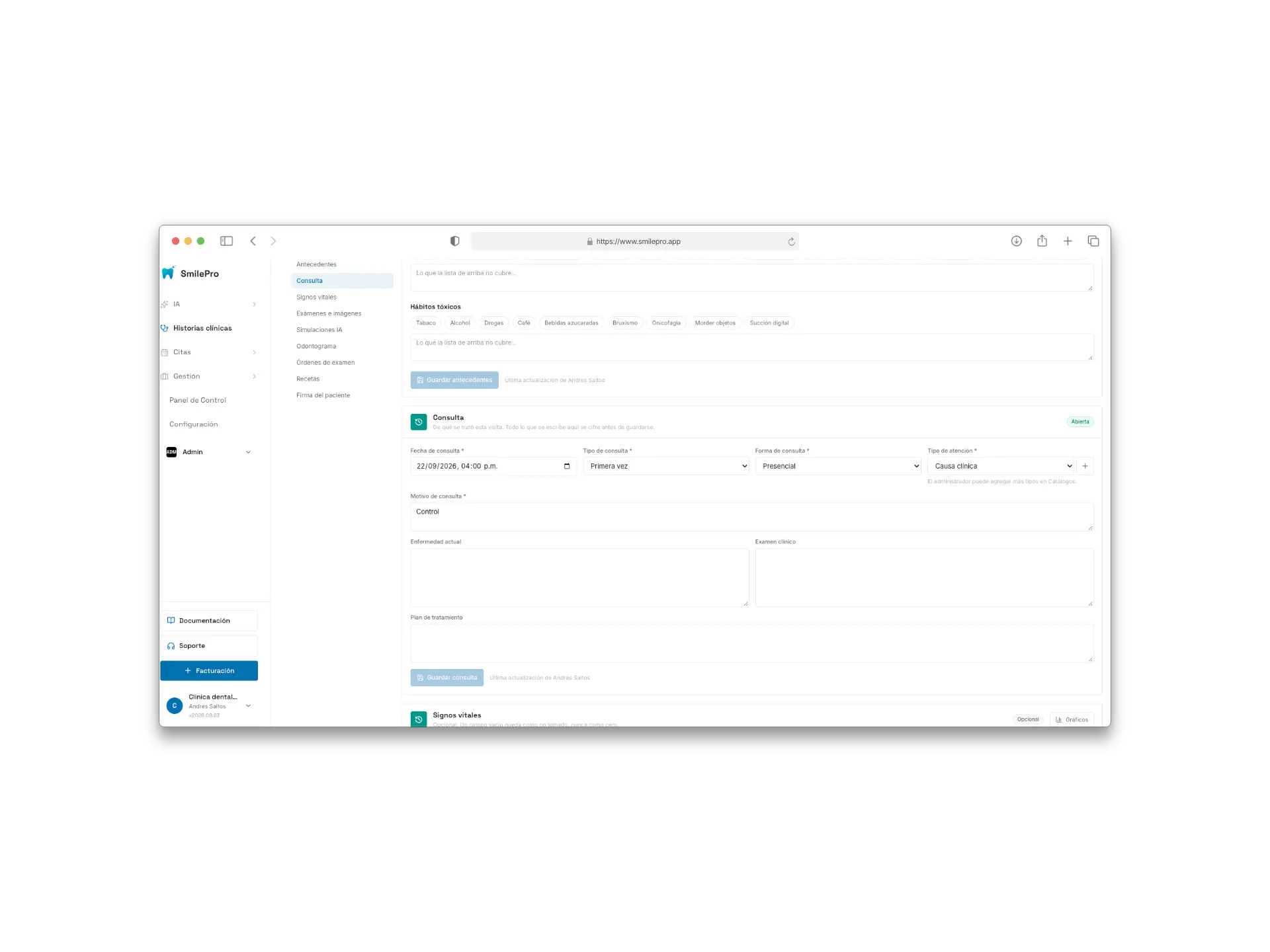
A full visit: header, left rail and the consultation block open.
Una visita completa: encabezado, índice lateral y el bloque de consulta abierto.
https://cdn.smilepro.app/docs/clinical-history-visit.webp