Scheduling, clinical records and AI smile design in one place
Book appointments with automatic reminders, keep every patient's clinical history with odontogram, prescriptions and certificates, and show them a possible cosmetic result with AI. One system for your whole dental practice.
No credit card required
Already have an account? Sign in →
New AI Preview
Sample patient photo ready
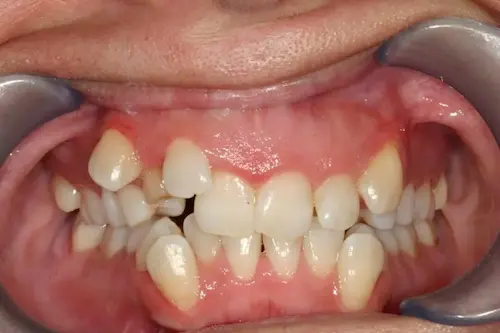
From Preview to Booked Chair in 4 Steps
One platform for the whole patient journey — from the first photo to the appointment that confirms itself
Upload Patient Photo
Upload a sharp frontal photo with the teeth visible. Photo quality is the biggest factor in how realistic the result looks.
Generate AI Preview
Pick the treatment (veneers, aligners, All-on-X or whitening) and a style. The simulation is ready in seconds and uses one image credit.
Present the visualization
Share the preview with your patient. Generate a branded presentation PDF with procedures you select and pricing you configure.
Book It and Let It Confirm Itself
Pick a free slot in the calendar and the reminder goes out on its own — email or WhatsApp to the patient, a copy to the professional. Fewer no-shows, zero reminder calls.
A full chair. Without the reminder calls.
Every appointment confirms itself: your patient gets the reminder by email or WhatsApp, the professional gets their copy, and your front desk just looks at the day.
One calendar, four ways to read it
Day view with a column per professional, week grid, month overview and an agenda list. Click any free slot to book on the spot.
Reminders that reach both sides
The patient receives an email with the appointment attached to their calendar, or a WhatsApp message written with your clinic template. The professional gets notified too.
Confirm in one click
Mark an appointment as confirmed by call, WhatsApp or email. Waiting room, in consultation, attended, no show — the front desk always knows where every patient stands.
Nothing gets double booked
Each professional declares their hours and how long a visit takes. The calendar only offers free slots, and blocks a second booking on the same one.
Monday agenda
3 professionals · 8 appointments
María García
09:00 · Confirmed by WhatsApp
Luis Méndez
11:00 · Confirmed by call
Carlos Ruiz
09:30 · Pending confirmation
Ana Torres
10:00 · In waiting room
Reminder sent by email
María García · appointment attached (.ics)
WhatsApp ready to send
Carlos Ruiz · your clinic template
Professional notified
Dr. Ruiz · agenda for tomorrow
María García
Visit #4 · Dr. Ruiz · today
Reason for visit
Sensitivity in upper right molar
Odontogram
Clinical text encrypted
AES-256 before it is saved
Prescription sent by email
PDF with logo and signature
The whole clinical history on a single page.
Open the visit straight from the appointment and fill in medical history, consultation, vital signs, exams and odontogram without jumping between screens. Everything stays in the patient's folder, visit after visit.
Everything the visit needs, in order
Medical history and habits, reason for the visit, current illness, examination, vital signs with BMI, exam results and images — plus the patient's AI simulations next to their record.
An odontogram that becomes a quote
Mark diagnoses and procedures by tooth, surface or arch using FDI numbering. Each procedure goes straight into the patient's treatment budget.
Prescriptions, certificates and exam orders
Branded PDFs with your logo and signature, ready to download or email. Save reusable prescriptions, exam lists and certificate templates for your clinic.
Clinical text encrypted
Everything the professional writes in the record is encrypted with AES-256 before it is stored, and each change is kept in the section's history.
A periodontal chart that draws itself.
Record margin, probing depth, bleeding, plaque, mobility and furcation site by site. The pocket is drawn over each tooth as you type, and the analysis compares every exam with the previous one.
Fast, keyboard-first entry
One digit is a full reading and the cursor jumps to the next site, so you can dictate a whole quadrant without touching the mouse.
The pocket, drawn for you
Gingival margin, pocket base and CEJ are plotted over every tooth in millimetres. Attachment level is calculated, never typed.
Compare exams and show progress
Initial exam, re-evaluation and maintenance side by side: plaque, bleeding and pocket percentages with clear improvement arrows.
Periodontogram
María García · Initial exam · Buccal face
Bleeding on probing
42 % → 12 % since the last exam
Auto-advance on
Type digits, no mouse needed
Plan on the face. Quote it in one click.
Mark toxin, fillers or threads on your patient’s photo. Every mark becomes a priced line, and the plan becomes a budget your patient understands at a glance.
Every mark, a priced line
Fixed price or per quantity — U, ml, syringe. 20 U of toxin at $12 is $240, with discounts and tax worked out for you.
Present it to the patient
A step-by-step presentation mode, with or without prices, and a PDF with the drawn face and your clinic’s brand.
From plan to treatment
Budget, instalments, the progress of each procedure and the patient’s signature, with versions and an auditable history.
Full-face harmonization
Sofía Vega · Dr. María Gómez
%22%20stroke%3D%22%23CFC6BF%22%20stroke-width%3D%221.5%22%2F%3E%0A%0A%20%20%3C!--%20Neck%20and%20shoulders%20--%3E%0A%20%20%3Cpath%20d%3D%22M232%20600%20C236%20660%20230%20712%20196%20748%20C160%20772%20110%20784%2040%20800%20L560%20800%20C490%20784%20440%20772%20404%20748%20C370%20712%20364%20660%20368%20600%20Z%22%20fill%3D%22%23ECDFD6%22%20stroke%3D%22%23B9A79C%22%20stroke-width%3D%221.6%22%20stroke-linejoin%3D%22round%22%2F%3E%0A%20%20%3Cpath%20d%3D%22M236%20640%20C262%20668%20338%20668%20364%20640%20L366%20700%20C330%20716%20270%20716%20234%20700%20Z%22%20fill%3D%22url(%23neckShade)%22%2F%3E%0A%20%20%3Cpath%20d%3D%22M262%20742%20C280%20752%20320%20752%20338%20742%22%20fill%3D%22none%22%20stroke%3D%22%23C9B6AA%22%20stroke-width%3D%221.2%22%20stroke-linecap%3D%22round%22%2F%3E%0A%0A%20%20%3C!--%20Ears%20--%3E%0A%20%20%3Cpath%20d%3D%22M150%20352%20C128%20340%20116%20360%20120%20392%20C124%20428%20134%20456%20156%20470%20C162%20450%20160%20400%20150%20352%20Z%22%20fill%3D%22url(%23skin)%22%20stroke%3D%22%23B9A79C%22%20stroke-width%3D%221.6%22%2F%3E%0A%20%20%3Cpath%20d%3D%22M142%20380%20C134%20392%20136%20420%20146%20440%22%20fill%3D%22none%22%20stroke%3D%22%23CDBBB0%22%20stroke-width%3D%221.2%22%20stroke-linecap%3D%22round%22%2F%3E%0A%20%20%3Cpath%20d%3D%22M450%20352%20C472%20340%20484%20360%20480%20392%20C476%20428%20466%20456%20444%20470%20C438%20450%20440%20400%20450%20352%20Z%22%20fill%3D%22url(%23skin)%22%20stroke%3D%22%23B9A79C%22%20stroke-width%3D%221.6%22%2F%3E%0A%20%20%3Cpath%20d%3D%22M458%20380%20C466%20392%20464%20420%20454%20440%22%20fill%3D%22none%22%20stroke%3D%22%23CDBBB0%22%20stroke-width%3D%221.2%22%20stroke-linecap%3D%22round%22%2F%3E%0A%0A%20%20%3C!--%20Face%20--%3E%0A%20%20%3Cpath%20d%3D%22M300%20128%20C228%20128%20168%20168%20154%20250%20C146%20300%20144%20360%20146%20410%20C148%20470%20162%20528%20196%20580%20C224%20622%20262%20650%20300%20652%20C338%20650%20376%20622%20404%20580%20C438%20528%20452%20470%20454%20410%20C456%20360%20454%20300%20446%20250%20C432%20168%20372%20128%20300%20128%20Z%22%20fill%3D%22url(%23skin)%22%20stroke%3D%22%23B9A79C%22%20stroke-width%3D%221.8%22%20stroke-linejoin%3D%22round%22%2F%3E%0A%0A%20%20%3C!--%20Hairline%20fringe%20over%20the%20forehead%20--%3E%0A%20%20%3Cpath%20d%3D%22M154%20250%20C160%20176%20220%20120%20300%20118%20C380%20120%20440%20176%20446%20250%20C430%20196%20392%20160%20340%20152%20C318%20172%20280%20174%20252%20160%20C214%20172%20172%20204%20154%20250%20Z%22%20fill%3D%22url(%23hair)%22%20stroke%3D%22%23CFC6BF%22%20stroke-width%3D%221.2%22%2F%3E%0A%0A%20%20%3C!--%20Soft%20cheek%20tone%20--%3E%0A%20%20%3Cellipse%20cx%3D%22196%22%20cy%3D%22452%22%20rx%3D%2262%22%20ry%3D%2244%22%20fill%3D%22url(%23cheekL)%22%2F%3E%0A%20%20%3Cellipse%20cx%3D%22404%22%20cy%3D%22452%22%20rx%3D%2262%22%20ry%3D%2244%22%20fill%3D%22url(%23cheekL)%22%2F%3E%0A%0A%20%20%3C!--%20Brows%20--%3E%0A%20%20%3Cpath%20d%3D%22M174%20306%20C192%20290%20222%20282%20256%20290%20C262%20292%20264%20298%20258%20300%20C228%20296%20200%20300%20178%20312%20C172%20314%20170%20310%20174%20306%20Z%22%20fill%3D%22%23A99A92%22%2F%3E%0A%20%20%3Cpath%20d%3D%22M426%20306%20C408%20290%20378%20282%20344%20290%20C338%20292%20336%20298%20342%20300%20C372%20296%20400%20300%20422%20312%20C428%20314%20430%20310%20426%20306%20Z%22%20fill%3D%22%23A99A92%22%2F%3E%0A%0A%20%20%3C!--%20Eyes%20--%3E%0A%20%20%3Cpath%20d%3D%22M186%20356%20C202%20340%20242%20338%20258%20354%22%20fill%3D%22none%22%20stroke%3D%22%23A3928A%22%20stroke-width%3D%221.2%22%20stroke-linecap%3D%22round%22%20opacity%3D%220.7%22%20transform%3D%22translate(0%20-9)%22%2F%3E%0A%20%20%3Cpath%20d%3D%22M186%20357%20C204%20341%20240%20339%20258%20355%20C240%20368%20204%20370%20186%20357%20Z%22%20fill%3D%22%23FBF8F6%22%20stroke%3D%22%238E7D75%22%20stroke-width%3D%221.6%22%20stroke-linejoin%3D%22round%22%2F%3E%0A%20%20%3Ccircle%20cx%3D%22222%22%20cy%3D%22355%22%20r%3D%2211%22%20fill%3D%22%23A7978F%22%2F%3E%0A%20%20%3Ccircle%20cx%3D%22222%22%20cy%3D%22355%22%20r%3D%224.5%22%20fill%3D%22%236E605A%22%2F%3E%0A%20%20%3Ccircle%20cx%3D%22226%22%20cy%3D%22351%22%20r%3D%222%22%20fill%3D%22%23FFFFFF%22%20opacity%3D%220.9%22%2F%3E%0A%20%20%3Cpath%20d%3D%22M190%20366%20C206%20378%20238%20378%20254%20364%22%20fill%3D%22none%22%20stroke%3D%22%23D3C2B8%22%20stroke-width%3D%221.1%22%20stroke-linecap%3D%22round%22%2F%3E%0A%20%20%3Cpath%20d%3D%22M414%20356%20C398%20340%20358%20338%20342%20354%22%20fill%3D%22none%22%20stroke%3D%22%23A3928A%22%20stroke-width%3D%221.2%22%20stroke-linecap%3D%22round%22%20opacity%3D%220.7%22%20transform%3D%22translate(0%20-9)%22%2F%3E%0A%20%20%3Cpath%20d%3D%22M414%20357%20C396%20341%20360%20339%20342%20355%20C360%20368%20396%20370%20414%20357%20Z%22%20fill%3D%22%23FBF8F6%22%20stroke%3D%22%238E7D75%22%20stroke-width%3D%221.6%22%20stroke-linejoin%3D%22round%22%2F%3E%0A%20%20%3Ccircle%20cx%3D%22378%22%20cy%3D%22355%22%20r%3D%2211%22%20fill%3D%22%23A7978F%22%2F%3E%0A%20%20%3Ccircle%20cx%3D%22378%22%20cy%3D%22355%22%20r%3D%224.5%22%20fill%3D%22%236E605A%22%2F%3E%0A%20%20%3Ccircle%20cx%3D%22382%22%20cy%3D%22351%22%20r%3D%222%22%20fill%3D%22%23FFFFFF%22%20opacity%3D%220.9%22%2F%3E%0A%20%20%3Cpath%20d%3D%22M410%20366%20C394%20378%20362%20378%20346%20364%22%20fill%3D%22none%22%20stroke%3D%22%23D3C2B8%22%20stroke-width%3D%221.1%22%20stroke-linecap%3D%22round%22%2F%3E%0A%0A%20%20%3C!--%20Nose%20--%3E%0A%20%20%3Cpath%20d%3D%22M284%20350%20C282%20392%20276%20424%20266%20448%22%20fill%3D%22none%22%20stroke%3D%22%23CDBBB0%22%20stroke-width%3D%221.3%22%20stroke-linecap%3D%22round%22%2F%3E%0A%20%20%3Cpath%20d%3D%22M316%20350%20C318%20392%20324%20424%20334%20448%22%20fill%3D%22none%22%20stroke%3D%22%23CDBBB0%22%20stroke-width%3D%221.3%22%20stroke-linecap%3D%22round%22%2F%3E%0A%20%20%3Cpath%20d%3D%22M266%20450%20C256%20466%20266%20482%20284%20476%20C290%20486%20310%20486%20316%20476%20C334%20482%20344%20466%20334%20450%22%20fill%3D%22none%22%20stroke%3D%22%23A3928A%22%20stroke-width%3D%221.6%22%20stroke-linecap%3D%22round%22%20stroke-linejoin%3D%22round%22%2F%3E%0A%20%20%3Cpath%20d%3D%22M280%20470%20C284%20466%20290%20466%20292%20470%22%20fill%3D%22none%22%20stroke%3D%22%23A3928A%22%20stroke-width%3D%221.2%22%20stroke-linecap%3D%22round%22%2F%3E%0A%20%20%3Cpath%20d%3D%22M320%20470%20C316%20466%20310%20466%20308%20470%22%20fill%3D%22none%22%20stroke%3D%22%23A3928A%22%20stroke-width%3D%221.2%22%20stroke-linecap%3D%22round%22%2F%3E%0A%0A%20%20%3C!--%20Philtrum%20and%20nasolabial%20folds%20--%3E%0A%20%20%3Cpath%20d%3D%22M292%20488%20L290%20512%20M308%20488%20L310%20512%22%20stroke%3D%22%23DCCBC0%22%20stroke-width%3D%221.1%22%20stroke-linecap%3D%22round%22%2F%3E%0A%20%20%3Cpath%20d%3D%22M262%20474%20C246%20496%20238%20518%20240%20546%22%20fill%3D%22none%22%20stroke%3D%22%23DCC8BC%22%20stroke-width%3D%221.3%22%20stroke-linecap%3D%22round%22%2F%3E%0A%20%20%3Cpath%20d%3D%22M338%20474%20C354%20496%20362%20518%20360%20546%22%20fill%3D%22none%22%20stroke%3D%22%23DCC8BC%22%20stroke-width%3D%221.3%22%20stroke-linecap%3D%22round%22%2F%3E%0A%0A%20%20%3C!--%20Lips%20--%3E%0A%20%20%3Cpath%20d%3D%22M246%20532%20C262%20518%20280%20510%20292%20514%20Q300%20518%20308%20514%20C320%20510%20338%20518%20354%20532%20C330%20536%20270%20536%20246%20532%20Z%22%20fill%3D%22url(%23lip)%22%20stroke%3D%22%23B57E74%22%20stroke-width%3D%221.4%22%20stroke-linejoin%3D%22round%22%2F%3E%0A%20%20%3Cpath%20d%3D%22M246%20532%20C270%20536%20330%20536%20354%20532%20C342%20556%20318%20564%20300%20564%20C282%20564%20258%20556%20246%20532%20Z%22%20fill%3D%22url(%23lip)%22%20stroke%3D%22%23B57E74%22%20stroke-width%3D%221.4%22%20stroke-linejoin%3D%22round%22%2F%3E%0A%20%20%3Cpath%20d%3D%22M250%20532%20C274%20538%20326%20538%20350%20532%22%20fill%3D%22none%22%20stroke%3D%22%23A86F66%22%20stroke-width%3D%221.4%22%20stroke-linecap%3D%22round%22%2F%3E%0A%20%20%3Cpath%20d%3D%22M280%20548%20C292%20552%20308%20552%20320%20548%22%20fill%3D%22none%22%20stroke%3D%22%23E7C2BA%22%20stroke-width%3D%222%22%20stroke-linecap%3D%22round%22%20opacity%3D%220.7%22%2F%3E%0A%0A%20%20%3C!--%20Chin%20--%3E%0A%20%20%3Cpath%20d%3D%22M276%20604%20C290%20612%20310%20612%20324%20604%22%20fill%3D%22none%22%20stroke%3D%22%23DCC8BC%22%20stroke-width%3D%221.2%22%20stroke-linecap%3D%22round%22%2F%3E%0A%3C%2Fsvg%3E)
Budget created
4 procedures · $1,616.00
Presentation mode
Walk the patient through the plan
Settlement LIQ-000012
Dr. María Gómez · October 2026
Marked as paid
Bank transfer · 31/10/2026
Dr. María + Implant → 45%
The most specific rule wins
Specialist commissions, calculated on what was collected.
Set the percentage each specialist earns per treatment. Every patient payment generates its commission, and the month’s settlement is ready to review, pay and export.
Rules per specialist and treatment
A general percentage per specialist and exceptions per treatment: the most specific rule always wins.
Only on money actually collected
Partial payments, instalments and discounts are reflected on their own; a payment is never paid out twice, and a voided one is deducted next time.
An auditable history
Each settlement keeps the percentage it was calculated with, who generated it and who paid it — exportable to PDF or Excel.
Everything your dental practice needs, in one system
Scheduling, reminders, clinical records, expenses, inventory and AI smile visualization designed for licensed dental professionals
AI-Powered Smile Design
Upload the patient’s photo, choose the treatment and how far the change should go, and show a simulated result during the consultation. Every design is saved in the patient’s file.
- Veneers, clear aligners, All-on-X and whitening
- Natural, Hollywood or minimal style, plus free instructions
- Before/after comparison saved with the patient
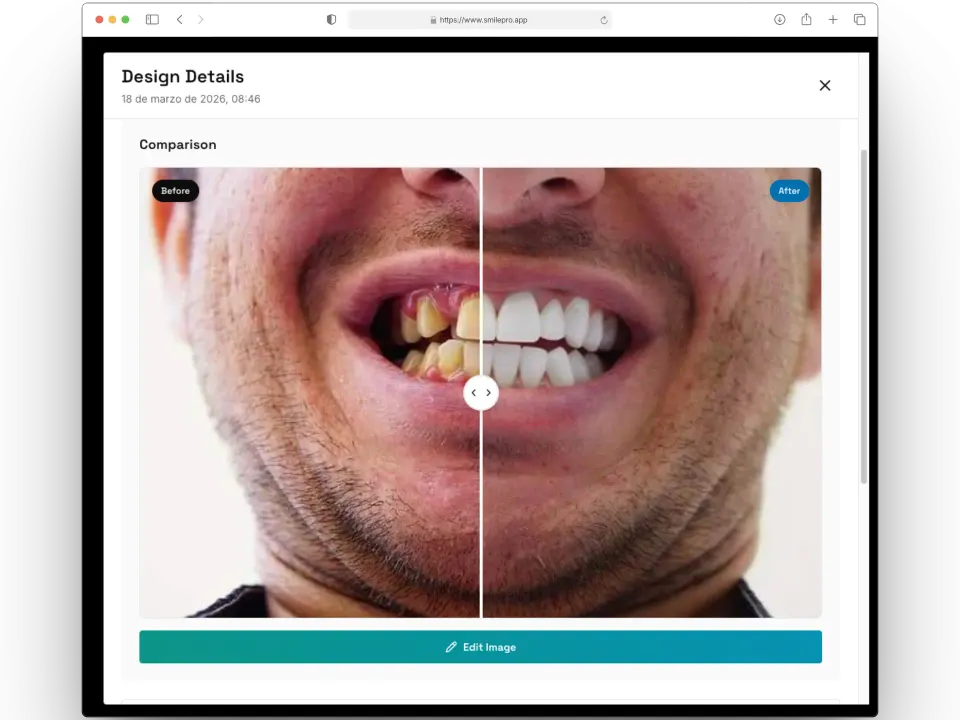
Before/after videos for social media
Turn a finished smile design into a short branded video: scenes, format, music and your logo. The MP4 is built in your browser and does not use credits.
- 1080×1920 vertical format for Reels & TikTok
- Add your clinic branding to every video
- One-click download and instant sharing
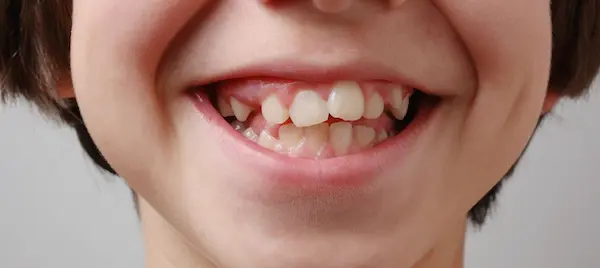
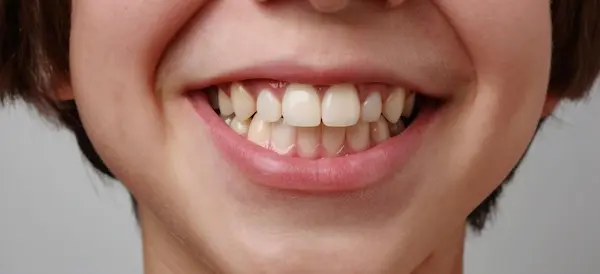
✨ Your new smile awaits!
Scheduling Built for a Dental Chair
Day, week, month and list views over one calendar. Each professional declares their hours and visit length, and the agenda only offers what is actually free.
- A column per professional, click a slot to book
- Filters by professional, status and branch
- Waiting room, in consultation, attended, no show
Reminders That Confirm Themselves
Every appointment can notify the patient and the professional. Email carries the visit as a calendar file; WhatsApp opens pre-written with your clinic template.
- Email with the appointment attached (.ics)
- WhatsApp with your own institutional template
- Confirm by call, WhatsApp or email in one click
Email reminder
María García · appointment.ics
Carlos Ruiz · clinic template
Professional
Dr. Ruiz · tomorrow’s agenda
Clinic expenses with VAT worked out
Record rent, supplies, the lab or salaries in seconds. Say whether the amount includes VAT and SmilePro splits subtotal, VAT and total, then shows where the money goes.
- Your own categories and VAT rates, managed in Catalogs
- Period totals and expenses by category
- Receipts attached, voids with a reason, Excel and PDF
Subtotal
$869.57
VAT 15%
$130.43
Total
$1,000.00
Inventory that books its own purchases
Medications and supplies with lots, expiry dates and every movement on record. A purchase can be booked as an expense in the same step, with its supplier invoice.
- Entries, exits and deliveries to patients
- Current stock and stock on any past day, in Excel
- Movements report with who, which patient and which invoice
Explain the treatment with an image, not only words.
A simulation helps the patient picture a possible result while you discuss options. It is a visual aid, not a promise of the final outcome.
Create your free accountNo credit card requiredImage editor
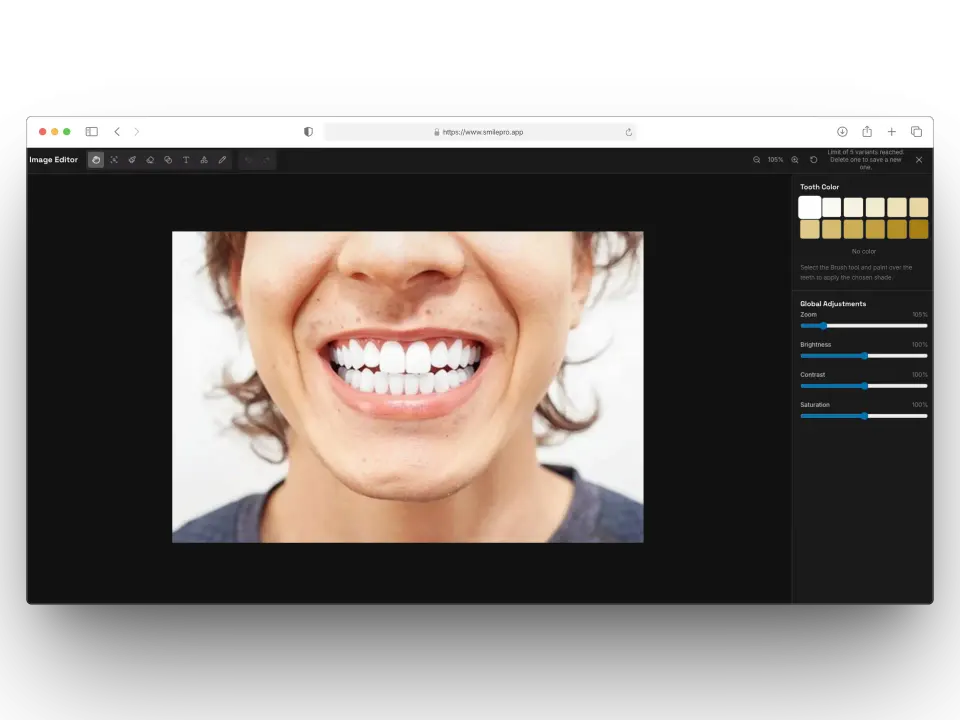
Adjust a generated result without spending another credit. Each save is kept as a variant under the original design.
- Paint a tooth shade over the teeth
- Brightness, contrast and saturation
- Annotate, blur, undo and redo
Patient presentation PDFs
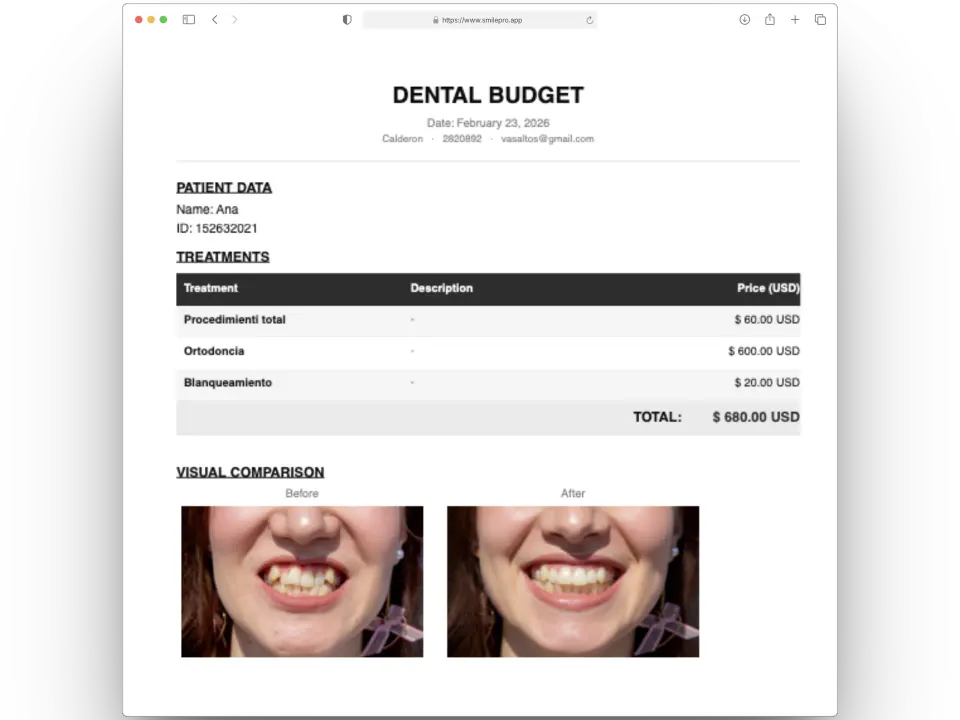
Generate branded presentation PDFs in seconds. Include smile previews, optional treatment presentation templates configured by the dental professional, pricing the clinic sets, and next steps—all in one PDF.
- Optional presentation templates you configure
- Pricing you enter for your practice
- Instant PDF generation and sharing
How dental professionals use SmilePro
Illustrated consultation workflows. These are product examples, not testimonials from named dentists or patients.
Cosmetic visualization
Upload a frontal photo, generate an AI smile visualization, and show the patient a possible cosmetic outcome before the dentist discusses options.
Patient presentation PDF
Attach the preview to a branded PDF with procedures the professional selects and prices the clinic sets — a take-home presentation, not a diagnosis.
Chairside preview
Generate a visualization in seconds during a consultation so the patient can see a simulation while talking with their dentist. Simulations are not guaranteed results.
Plans and features
Start on Free with one doctor included. On Plus, that same doctor user moves to monthly billing and every doctor you add is billed the same — paid doctors lift the patient and clinical-history caps.
| Plans and features | Free $0 1 doctor included | Plus* $9.99 per doctor user / month |
|---|---|---|
| Clinic | ||
| Doctor users | 1 included | $9.99 per doctor user / month, including your first doctor |
| Patients | 50 | Unlimited |
| Clinical histories | 50 | Unlimited |
| Appointment emails | 50 | 50 included, then pay as you go |
| File storage | 500 MB included | 500 MB included |
| Clinical practice | ||
| Calendar and appointments | Included | Included |
| Reminders by email, WhatsApp or call | Included | Included |
| Waiting room and visit status | Included | Included |
| Walk-in care without an appointment | Included | Included |
| Odontogram | Included | Included |
| Prescriptions | Included | Included |
| Certificates | Included | Included |
| Exam orders | Included | Included |
| Encrypted clinical notes | Included | Included |
| Budgets | Included | Included |
| Appointment and patient reports | Included | Included |
| Specialist commissions and settlements | Only on Plus | Included |
| Facial aesthetics planning and quoting | Only on Plus | Included |
| Expense management with VAT | Only on Plus | Included |
| Inventory with stock and movement reports | Only on Plus | Included |
| Team | ||
| Extra doctors | Only on Plus | $9.99 / month each |
| Administrators and assistants | 1 | Unlimited |
| Per-user permissions | Included | Included |
| AI and communication | ||
| AI smile previews | Pay as you go | Pay as you go |
| Patient presentation PDFs | Included | Included |
| Image editor | Included | Included |
| Before/after videos | Included | Included |
* Plus has no free doctor: the doctor included in Free is the same user, and on Plus it is billed monthly like every other doctor. You pay $9.99/month per doctor user (e.g. 3 doctors = 3 × $9.99). Administrators and assistants are not billed. Paid doctors also lift the patient, clinical-history and staff caps for the whole clinic.
AI smile previews stay pay as you go on both plans — from $10 for 30 previews. Extra storage is 50 GB from $9.99/month. Extra emails are blocks of 1000 from $2.99.
No card for Free · Cancel paid users anytime · AI credits valid for 1 year
Common questions
What is included in Free?
One professional — you, the owner — plus 50 patients, 50 clinical histories, 50 appointment emails and 1 administrator or assistant accounts. Before/after videos are included. AI smile previews you buy as credits. No credit card.
When do I need Plus?
When you add another doctor, when you want specialist commissions, expenses, inventory or facial aesthetics, or when 50 patients, 50 clinical histories or 1 staff accounts is no longer enough. On Plus every doctor user is billed monthly, including the one you had on Free. Paid doctors remove those caps for the clinic.
How are users billed?
Only doctor users are billed. Free includes one doctor user (the owner). On Plus that same user moves to monthly billing, and every additional doctor is another paid user. With 3 doctors you pay for 3. Administrators and assistants are not billed: Free includes 1 of them, Plus has no cap. You buy doctor capacity on Billing; you assign who sits in it under Settings → Professionals.
Are AI images included in Plus?
Smile previews are credits on both plans. Buy the pack you need — they stack and last 12 months. Before/after videos have no extra cost on Free or Plus.
What happens when I use the 50 emails?
Free stops at those 50. Plus keeps the same complimentary balance and then lets you buy more in blocks. One credit is one email to a patient or to a professional.
Can I cancel paid users?
Yes. Paid doctor users stay active until the end of the current billing period. After that date those extra accounts lose access; the owner’s user returns to the Free plan.
What devices does it work on?
SmilePro works on any computer or mobile device with a modern browser—Windows, Mac, iOS, or Android. No app installation required.
What payment methods are accepted?
We accept major credit cards. All transactions are secure and processed instantly.
Ready to try SmilePro?
Start on Free with one professional, 50 patients and 50 clinical histories. Add paid doctor users when the clinic grows.
✓ Free to start • ✓ 1 doctor free on Free, doctors on Plus $9.99 / month • ✓ Cancel anytime
Important
SmilePro is visualization and patient communication software. It does not provide medical or dental advice, diagnosis, treatment, prescriptions, or clinical decision-making. AI-generated images are simulations and should not be interpreted as a prediction or guarantee of treatment results. Read the Medical Disclaimer